

Your HubSpot portal is the central nervous system of your business, but are you using it to its full potential? All your customer, content, sales, and marketing data lives in one place, yet creating a truly personalized, real-time ...
 Remington Begg
·
·
11 min read
Remington Begg
·
·
11 min read

Your HubSpot portal is the central nervous system of your business, but are you using it to its full potential? All your customer, content, sales, and marketing data lives in one place, yet creating a truly personalized, real-time experience can still feel out of reach. This is where you have a golden opportunity to do something remarkable: build custom-crafted AI agents that grow your business smarter.
Imagine an assistant that not only provides helpful information but also works tirelessly to serve your employees, delight your customers, and guide prospects through their journey with personalized, intelligent interactions. These aren't generic chatbots; they are bespoke AI agents, powered by your company's unique data, frameworks, and point of view, living right inside your HubSpot portal.
Let's explore the types of custom AI agents you can create, broken down by the different stages of the buyer's journey.
The Buyer's Journey, Powered by AI
We can segment these agents based on where they provide the most value: helping new prospects become aware of you, guiding them through their consideration process, helping them make a decision, and delighting them once they become a customer.
Awareness Stage: Making a Great First Impression
At this stage, your goal is to attract visitors and provide immediate value. Your AI agents should be intelligent guides that offer help while learning more about your prospects.
1. The Marketing Campaign Agent
This agent is your secret weapon for a specific marketing campaign. Imagine you launch a new initiative around inbound marketing. This agent lives on your relevant blog posts and landing pages.
How it works:
When a visitor engages with the content, the agent can pop up. Instead of just saying "How can I help?", it can use the context of the page to ask a compelling, relevant question. As the user interacts, the agent intelligently asks follow-up questions that progressively profile them, capturing key data directly into their HubSpot contact record. If a user asks, "What are some blog ideas for my industry?", the agent won't give a generic ChatGPT answer. It will use your proprietary content frameworks to generate ideas, demonstrating your unique value from the very first interaction.
2. The "Smart Clippy" Content Concierge
Remember Clippy? Now imagine a version that’s actually helpful. This agent browses your site alongside your visitors, acting as a personal content librarian.
How it works:
This agent sees everything: the page the user is on, their CRM profile, and their viewing history. It connects these dots in real-time to proactively recommend the perfect next piece of content. If a known contact lands on a pricing page, it can recommend a relevant case study for their industry. For an anonymous visitor reading about a specific service, it can offer to summarize the key benefits or point them to an introductory guide, keeping them engaged and moving forward.
Consideration Stage: Building Trust and Providing Answers
When prospects are considering their options, they have questions. Your AI agents can provide instant, accurate answers that reinforce your company's unique position.
3. The Webinar Engagement Agent
Webinars are a cornerstone of consideration-stage marketing, but engagement can be a challenge. This agent turns a passive viewing experience into an interactive dialogue.
How it works:
The agent is deployed on your webinar viewing page, armed with all the information from the presentation, speaker notes, and related materials. Attendees can ask the agent questions during the webinar without disrupting the flow. The agent can provide detailed answers, reinforcing key points. If the attendee is unknown, the agent can work to convert them into a lead. For known contacts, it can use the context of their questions to tee up relevant next steps, like booking a consultation or downloading an advanced resource, helping them move further down the funnel.
4. The Hyper-Specific Location Bot
For businesses with physical locations, providing clear and specific information is crucial. A generic bot can't handle the nuance between different branches or offices.
How it works:
This agent is configured with data exclusive to a particular location: hours, services offered, specific pricing, staff information, and even unique features. When a user is on a location-specific page, the agent can provide instant driving directions, allow for "click-to-call" actions, and answer questions like, "Do you offer X service at the downtown location?" This ensures customers get accurate information tailored to their specific needs, eliminating confusion and frustration.
5. The Dynamic FAQ Agent
This goes beyond a standard, static FAQ page. It’s a conversational knowledge hub that delivers answers instantly.
How it works:
You empower this agent with a comprehensive list of frequently asked questions—not just from your knowledge base, but also the random, specific questions your sales and support teams hear every day. When a user asks a question, the agent provides a concise, direct answer. Unlike a knowledge base bot that might just link to an article, the FAQ agent answers the question directly in the chat, providing links only when deeper information is required. This provides immediate resolution and a seamless user experience.
Decision Stage: Closing the Deal with Confidence
As a prospect nears their decision, your AI agent can provide the final pieces of information and support they need to choose you.
6. The Sales Engagement Agent
This agent is designed to keep deals moving forward. For prospects with an open opportunity, it acts as an always-on assistant within a customer portal or deal room, proactively eliminating friction and maintaining momentum.
How it works:
The agent has the context of the entire deal. It knows what documents have been shared, the notes from the last meeting, and the proposed solution. A prospect can log into their portal and ask, "Can you remind me of the key points from our last call?" or "Where can I find the proposal?" The agent can also surface case studies of similar clients, explain the pricing breakdown, or clarify the next steps in the onboarding process—all based on the data in your HubSpot CRM. It can even notify the human sales rep when a high-intent question is asked, allowing them to jump in and provide personal support.
7. The Interactive Demo Agent
Product demos can be overwhelming. This agent acts as a co-pilot, guiding users through your software or customer portal to ensure they understand its value.
How it works:
On each page of your portal or app, the agent can be triggered to provide contextual help. If a user is on the "reporting" page, they can ask the agent, "How do I create a new report?" The agent can respond with step-by-step instructions, annotated images, or even a short video that plays directly within the chat. It can then provide a link that takes the user to the next logical step in the process, creating a guided, interactive tour that drives adoption and highlights key features.
Delight Stage: Nurturing Your Existing Customers
The journey isn't over after the sale. AI agents are powerful tools for customer success, helping with retention and identifying growth opportunities.
8. The Tailored Customer Agent
Your customers deserve support that is relevant to them. A one-size-fits-all support bot can be frustrating. This agent provides hyper-relevant, product-specific support.
How it works:
This agent's knowledge is scoped based on the customer's purchase history in HubSpot. If a customer has only ever purchased your "Red Widgets," the agent will only provide support information related to Red Widgets. It won't confuse them with information about the "Blue Widgets" they don't own. This creates a streamlined, relevant, and helpful support experience that makes the customer feel understood.
9. The Intelligent Upsell Agent
The best time to identify an upsell opportunity is when you're already providing value. This agent is trained to spot those moments.
How it works:
This agent can handle support inquiries, but its primary objective is to identify expansion revenue. It has the context of the customer's current services and their support history. If a customer frequently asks questions that could be solved by a higher-tier plan or an add-on service, the agent can provide the support they need and then intelligently pivot. It might say, "I've helped you with X. I see you do this often. Did you know our Pro Plan automates this entire process? Here's a quick video on how it works." It can then tee up a conversation with their account manager, creating a natural and valuable path to growth.
Taking It to the Next Level: AI Agents & HubSpot's Customer Journey Orchestration
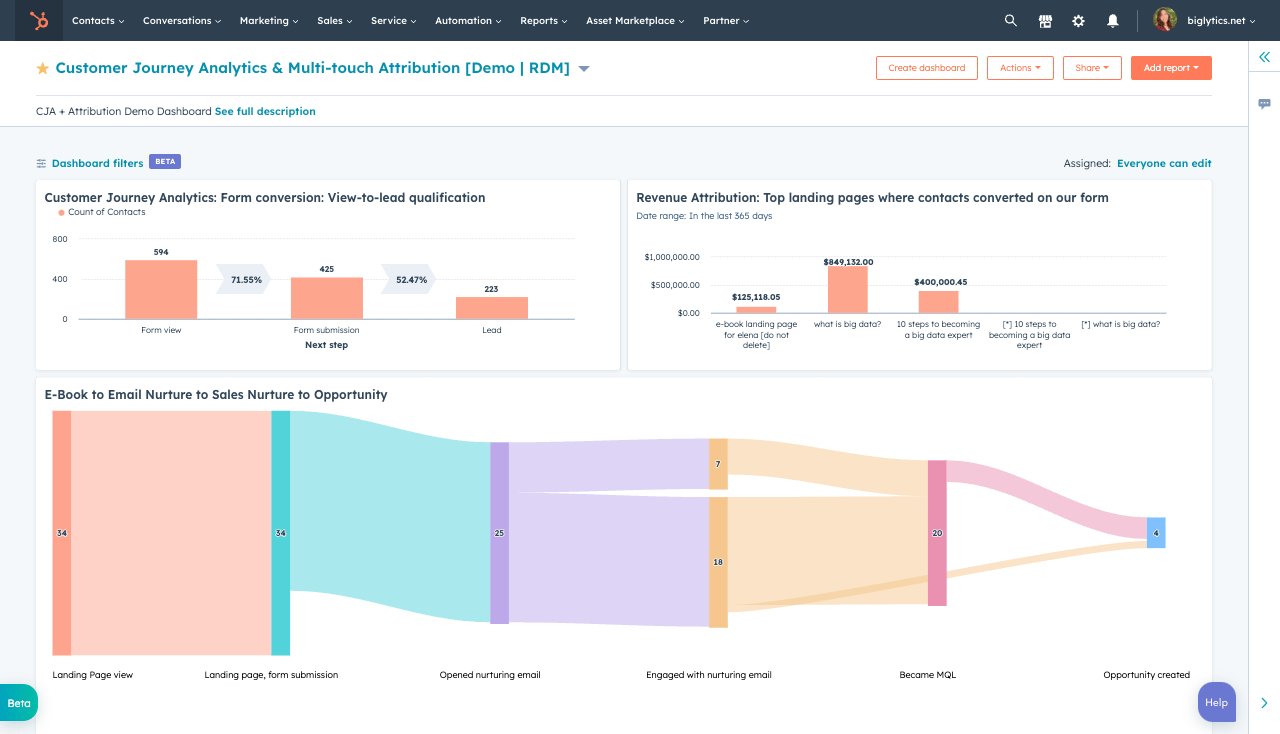
The AI agents we've described are powerful on their own, but their potential multiplies when connected to one of HubSpot’s most advanced features: Customer Journey Orchestration.
Think of traditional automation as a straight road—a user fills out a form and gets a predetermined series of emails. Journey Orchestration, however, is like a smart GPS. It creates dynamic, branching paths for each customer that adapt in real-time based on their every interaction—whether that's visiting a webpage, opening an email, talking to a sales rep, or, crucially, interacting with a custom AI agent.
By integrating an AI agent into an orchestrated journey, its conversations become the intelligent triggers that guide a customer's entire experience across every go-to-market channel.
Let's see how this works with two key examples.
Orchestrating the Top of the Funnel
Your top-of-funnel agents (like the Marketing Campaign Agent) are designed to attract and profile new prospects. By connecting them to Journey Orchestration, you can create a seamless, personalized path from their very first question.
The Scenario:
A new visitor arrives on your blog post about "improving manufacturing efficiency." Your Marketing Campaign Agent engages them. In the conversation, the visitor mentions they are a "plant manager" and asks a question about "reducing equipment downtime."
The AI Agent's Dual Role:
-
It answers the question using your company's unique framework for minimizing downtime, immediately establishing expertise.
-
It captures data. The agent updates the contact's HubSpot record in real-time with
Persona: Plant Managerand sets a custom propertyInterest: Equipment Downtime.
Journey Orchestration Takes Over:
The agent's action of updating the contact property is the trigger that initiates a multi-channel journey.
-
Website Personalization: Instantly, the content on your website adapts. Smart CTAs and banners now display case studies of how you've helped other plant managers reduce downtime.
-
Marketing Nurture: The next day, the contact is enrolled in a hyper-specific email workflow that sends them a guide on "5 Preventative Maintenance Strategies for Plant Managers," directly addressing their stated interest.
-
Sales Alignment: The contact is added to a "High-Intent MQL" list. If they download the guide, a task is automatically created for a sales rep who specializes in manufacturing, complete with the full AI chat transcript for context.
-
Ad Retargeting: The contact is added to a targeted audience on LinkedIn for an ad campaign focused on your preventative maintenance solutions for manufacturing.
The result: A single conversation with an AI agent has kicked off a completely coordinated and personalized experience that guides the prospect from a casual blog reader to a warm, educated lead, all without manual intervention.
Orchestrating the Upsell Journey
Now, let's look at the Intelligent Upsell Agent (Agent #9). Its job is to spot growth opportunities with existing customers. Paired with Journey Orchestration, it can launch a full sales and marketing play from a single support query.
The Scenario:
An existing customer on your "Standard Plan" is interacting with the support-focused Upsell Agent. They ask, "How can I get more detailed analytics on my team's performance?"
The AI Agent's Dual Role:
-
It provides value. The agent explains that their current plan offers basic analytics but that the "Pro Plan" includes the advanced dashboards they're looking for.
-
It identifies intent. Recognizing a clear upsell signal, the agent sets a custom property on their contact record:
Upsell_Interest: Pro_Plan_Analytics.
Journey Orchestration Takes Over:
This property change triggers a journey designed to close the expansion deal.
-
Internal Notification: An immediate, high-priority task is assigned to the customer's Account Manager. The task includes the chat transcript and a note: "Customer inquired about Pro Plan analytics. Follow up within 24 hours."
-
In-App Messaging: The next time the customer logs into your portal, a pop-up appears: "Unlock Advanced Analytics. See what you're missing with a 5-minute video tour of the Pro Plan."
-
Targeted Nurture: The customer receives a short, two-part email series. Email 1 showcases a case study of a similar company that increased ROI using Pro Plan analytics. Email 2 is a direct invitation to a 15-minute call with their Account Manager to discuss an upgrade.
-
Dynamic Pathing: The journey has branching logic. If the customer books the meeting, the email nurture stops. If they watch the video but don't book, the Account Manager gets a second notification to make a personal phone call.
The result: The AI agent acts as an intelligent sensor for your business. It transforms a simple support question into a fully orchestrated, multi-touchpoint sales process, ensuring no revenue opportunity is missed and the customer receives timely, relevant information that helps them make a decision.
Additional Ideas: Empowering Your Internal Teams
AI agents don't just have to be for your customers. You can build powerful internal tools that live right within HubSpot to help your employees work smarter.
Internal Support Agent:
Imagine a CRM card inside every contact record that your support reps can use. If a rep is on the phone with a frustrated customer, they can ask an internal AI agent, "What are our best talking points for handling pricing objections for this service tier?" The agent, using your internal playbooks, can instantly provide the best-practice responses. It could also suggest the "next best action" for a sales rep based on a contact's recent activity, helping your team be more proactive and effective.
By weaving your custom AI agents into the fabric of Customer Journey Orchestration, you create a business that doesn't just react—it anticipates, guides, and personalizes every step of the customer experience, from start to finish. The question is no longer if you should leverage AI, but what unique and valuable experience you will build first.
